6 May 2016
JSF Ajax
Echo demo
►
Ajax
tag basic attributes
► Event
► Execute
► Render
<h:body
>
<h:form>
Name: <h:inputText
value="#{user.name}" id="name">
<f:ajax
event="keyup" execute=”name”
render="echo"/>
</h:inputText>
Password: <h:inputSecret
value="#{user.password}"
id="password" size="8"/>
<h:commandButton value="login"
action="welcome"/>
<h:outputText id="echo"
value="#{user.name}"/></p>
</h:form>
</h:body>
How tag interacts with lifecycle
o Execute
o Render
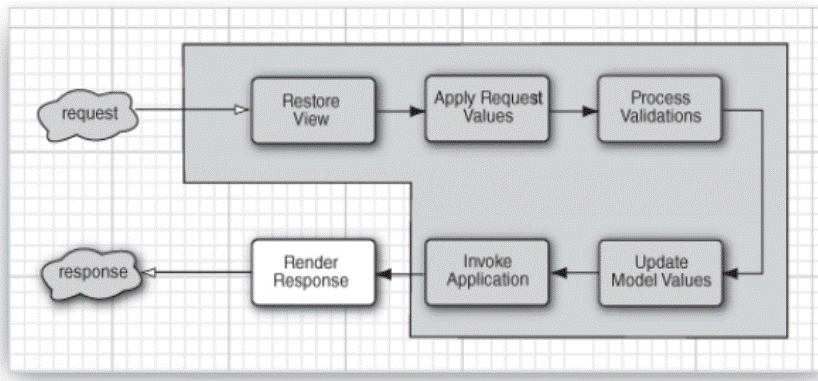
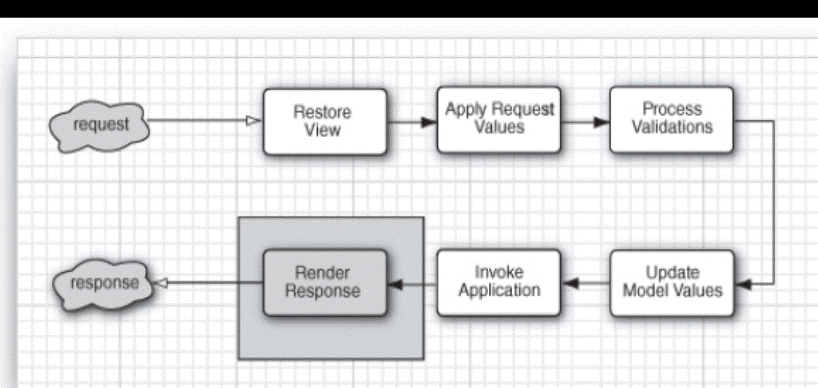
► execute attribute
o
a
space-delimited String of component
identifiers
o
keywords: @all, @form, @none, @this
o
ValueExpression to a Collection
of String objects.
o
default value is @this.
►
render
attribute
o
same
as execute, except default is @none
►
event
attribute
o
event
that triggers Ajax reques
o
javascript
events without “on” prefix
o
or
‘action’ for command buttons and links or valueChange
for inputs
1.
these
are defaults
►
listener
attribute
o
JSF
invokes this method once during IA phase
1. The JSF Ajax tag specifies which components should be
executed and which should be rendered.
Executed elements run through the entire lifecycle except Render
Response. Rendered elements have only
the Render Response phase. Understanding
the JSF lifecycle is critical to understanding JSF Ajax. Science of Consciousness: You
can gain the benefits of acting in accord with all the laws of nature without
have to understand the details of all the laws of nature because your brain
physiology is capable of experiencing the unified field, which is pure
consciousness, your Self.
Typical use cases for ajax
applications
► Field validation
► Form filling
► Rich client interface functionality
through partial page refreshing
Ajax Field Validation
<h:panelGrid columns="2">
Name:
<h:panelGroup>
<h:inputText value="#{user.name}"
id="name" validator="#{user.validateName}">
<f:ajax event="keyup" render="nameError"/>
</h:inputText>
<h:message id="nameError" for="name"
style="color: red"/>
</h:panelGroup>
Password: <h:inputSecret
value="#{user.password}"
id="password" size="8"/>
<h:commandButton value="login" action="welcome"/>
</h:panelGrid>
public void validateName(FacesContext fc, UIComponent c,
Object value) {
if (((String) value).contains("_"))
throw new ValidatorException(
new FacesMessage("Name cannot contain
underscores"));
}
Monitoring response status and handling
errors
► Via onevent and onerror attributes
► JSF passes a data object to any js (callback) function registered via the onevent or onerror attributes
o Callback is arbitrary function
developer writes
o Can access response text via the data
object
► Data object has status (and other)
properties (p398)
o For onevent
will be one of begin, complete, or success
o For onerror
will be one of httpError, emptyResponse,
malformedXML, or serverError
requestMonitor
Demo
<h:body
>
<h:outputScript library="javascript"
name="prototype-1.6.0.2.js"/>
<h:outputScript library="javascript"
name="login.js"/> //both libraries
share the same global namespace of page
<h:form>
<h:panelGrid columns="2">
Name:
<h:panelGroup>
<h:inputText value="#{user.name}"
id="name" validator="#{user.validateName}">
<f:ajax event="keyup"
render="nameError" onevent= "com.corejsf.showProgress"/>
</h:inputText>
<h:message id="nameError"
for="name" style="color: red"/>
<h:graphicImage id="pole"
library="images"
name="orange-barber-pole.gif"
style="display: none"/>
</h:panelGroup>
Password: <h:inputSecret value="#{user.password}"
id="password" size="8"/>
<h:commandButton value="login"
action="welcome"> //what gets executed and rendered?
<f:ajax/>
</h:commandButton>
</h:panelGrid>
</h:form>
</h:body>
login.js
if (!com) var
com = {}
if (!com.corejsf)
{
com.corejsf = {
showProgress: function(data) { //the callback
method registered with JSF ajax
var inputId =
data.source.id;
var progressbarId = inputId.substring(0, inputId.length
- "name".length) + "pole";
/* show at beginning of ajax
call, hide at end */
if (data.status === "begin") Element.show(progressbarId); //Element is object from Prototype
else if (data.status === "success") Element.hide(progressbarId);
}
}
}
2. JSF Ajax passes a data object to functions assigned to
the onevent or onerror
attributes so status and errors can be appropriately handled. Science of Consciousness: The state of Self-referral pure awareness
that one gains through transcending is the ultimate data object for monitoring
your personal status and acting without errors.
Viewing Ajax requests and responses in Chrome
JS console
►
Easy
– just open the Chrome console (Ctrl-Shift-j) and view the network tab
JavaScript namespaces
JavaScript
object literals
fido = {name: “fido”, owner: “Sam Green”}
or, equiv
fido = {};
fido.name = “fido”
fido.owner = “Sam Green”
if (!com) var
com = {} ; //make
sure are not overwriting another object named com
if (!com.corejsf)
{ //make
sure are not overwriting pre-existing corejsf
property of com
com.corejsf = { //com.corejsf will be an object
with showProgress function as value of that property,
…
showProgress: function(data) {
… },
anotherMethod:
function(param1, param2) {
…..},
andAnotherMethod:
function(param1, …){ … }
} //end of com.corejsf object literal
} //end of if !com.corejsf then clause
OR,
equivalently, could do,
/*
create the namespace */
if (!com) var
com = {} ;
if (!com.corejsf) com.corejsf =
{ };
/*
populate with methods */
com.corejsf.showProgress = function(data)
{ … };
com.core.jsf.anotherMethod = function(param1,
param2) { … };
►
Point: this keeps all of your functions out of the
global namespace and protects them and other functions that might have same
names from overwriting each other.
JSON notation
► same as object literal except property names must be double quoted
► name value pairs
► language independent text format
► Example
myObject = {
"first": "John",
"last": "Doe",
"age": 39,
"sex": "M",
"salary": 70000,
"registered": true,
"favorites": {
"color":
"Blue",
"sport":
"Soccer",
"food":
"Spaghetti"
}
}
myObject.favorites.food returns Spaghetti
Queueing ajax events
► Ajax calls are all queued and
delivered in order
o Non-ajax calls not queued
► Don’t mix ajax requests and regular
requests on the same page
o E.g., ajax on input field with onblur listener method = calcAgeOfUniverse
o Non-ajax command button with action
method = displayAgeOfUniverse
o Type input, click button,
o What could possibly go wrong?
► E.g., requestMonitor
<h:commandButton value="login"
action="welcome">
<f:ajax execute="@form"
render="@form" />
</h:commandButton>
3. Ajax events are queued and delivered in order, but non
Ajax events are not. Science of Consciousness: The ability to have broad awareness along
with fine focus that you develop through regular practice of the TM Technique
supports the ability to spontaneously coordinate all events and actions in
daily life.
Using Ajax in a Composite Component
►
Good
example of:
o
common
Ajax use case
o
composite
components
o
JavaScript
in a composite component
o
events
§
Onblur
§
Onkeyup
§
Onfocus
§
value
change listener
o
Javascript
timers and coalescing keystrokes
o
jsf.ajax
tag and ajax.jsf.request object
o
jsf
ajax onError callback
…
xmlns:util=http://java.sun.com/jsf/composite/util
…
<util:autoComplete
value="#{user.city}" completionItems="#{autoComplete.locations}"
/>
…
@Named
@ApplicationScoped
public class AutoComplete
{
public String[] getLocations() {
return new
String[] {
"Arvada", "Colorado
Springs", "Baltimore", "Brittany",
"Bahamas",
"Belgrade",
"Boulder", "Bayou", "Brighton",
"Buffalo", "Denver", "Dixie",
"Evergreen", "Ft.
Collins", "Los Angeles", "Los Lobos", "Las
Vegas",
"Loveland",
"Vail"
};
}
}
<ui:composition>
<composite:interface>
<composite:attribute name="value" required="true"/>
<composite:attribute name="completionItems"
required="true"/>
</composite:interface>
<composite:implementation>
<h:outputScript library="javascript" name="prototype-1.6.0.2.js"
target="head"/>
<h:outputScript
library="javascript" name="autoComplete.js"
target="head"/>
<h:inputText id="input" value="#{cc.attrs.value}"
valueChangeListener="#{autocompleteListener.valueChanged}" <!- - server
side code, JSF - ->
onkeyup="com.corejsf.updateCompletionItems(this,
event)" <!- - Ajax to get list items -
->
onblur="com.corejsf.inputLostFocus(this)"/> <!- - JS to
hide list - ->
<h:selectOneListbox id="listbox"
style="display: none"
valueChangeListener="#{autocompleteListener.completionItemSelected}" <!- - server
side - >
onfocus="com.corejsf.listboxGainedFocus()"> <!- - no op -
->
<f:selectItems value="#{cc.attrs.completionItems}"/>
<f:ajax
render="input"/>
</h:selectOneListbox>
</composite:implementation>
</ui:composition>
autoComplete.js
if (!com) var
com = {};
if (!com.corejsf)
{
var
focusLostTimeout;
com.corejsf =
{
/* show error
message */
errorHandler:
function(data) {
alert("Error
occurred during Ajax call: " + data.description)
;
},
keystrokeTimeout: “ “, //should be global to updateCompletionItems
/* Make Ajax
request to render completion items for current input. Cancel any queued
call. */
updateCompletionItems: function(input,
event) {
//var keystrokeTimeout;
jsf.ajax.addOnError(com.corejsf.errorHandler); //give jsf.ajax a callback method in case of an error (p400,403)
var
ajaxRequest =
function() {
/* ajax to execute iinput element and
render listbox */
jsf.ajax.request(input,
event, {
render:
com.corejsf.getListboxId(input),
x: Element.cumulativeOffset(input)[0],
y: Element.cumulativeOffset(input)[1] + Element.getHeight(input)
})
}
/*
coalesce keystrokes – only make request if 350ms gap in keystrokes */
window.clearTimeout(this.keystrokeTimeout) ;
this.keystrokeTimeout
= window.setTimeout(ajaxRequest, 350);
},
/* hide the
completion listbox 200msec after tab out of input */
inputLostFocus: function(input) {
var
hideListbox = function() {
Element.hide(com.corejsf.getListboxId(input));
}
focusLostTimeout
= window.setTimeout(hideListbox,
200);
},
/* helper fn to get listbox id */
getListboxId:
function(input) {
var
clientId = new String(input.name);
var
lastIndex = clientId.lastIndexOf(":");
return clientId.substring(0, lastIndex)
+ ":listbox"
}
}
}
AutocompleteListener.java
/**
Managed bean
that generates the autocompletion list contents. */
@Named
@SessionScoped
public class AutocompleteListener
implements Serializable {
private static
String COMPLETION_ITEMS_ATTR = "corejsf.completionItems";
/* called by value change listener when input
component goes through ajax execute phase
Updates the list of
completion items in the listbox.
*/
public void valueChanged(ValueChangeEvent e) {
UIInput input =
(UIInput)e.getSource(); //get the input
element
UISelectOne listbox = (UISelectOne)input.findComponent("listbox"); //find the listbox element
if (listbox != null) {
UISelectItems
items = (UISelectItems)listbox.getChildren().get(0);
Map<String, Object> attrs = listbox.getAttributes(); //components have their own set of attributes
List<String> newItems
= getNewItems((String)input.getValue(), getCompletionItems(listbox, items, attrs));
items.setValue(newItems.toArray());
setListboxStyle(newItems.size(), attrs);
}
}
/* returns list
containing items that match new input text value */
private
List<String> getNewItems(String
inputValue, String[] completionItems)
{
List<String> newItems
= new ArrayList<String>();
for (String item
: completionItems) {
String s = item.substring(0, inputValue.length());
if (s.equalsIgnoreCase(inputValue)) newItems.add(item);
}
return newItems;
}
private void setListboxStyle(int rows,
Map<String, Object> attrs) {
if (rows > 0)
{ //display
the listbox with new elements
Map<String, String> reqParams = FacesContext.getCurrentInstance().getExternalContext().getRequestParameterMap();
attrs.put("style", "display: inline; position:
absolute; left: " + reqParams.get("x")
+ "px;" + " top: " + reqParams.get("y") + "px");
}
else
attrs.put("style", "display: none;"); //or hide it if
no elements
}
/* helper method for getting completion
items stored in attributes of this component */
private String[] getCompletionItems(UISelectOne listbox, UISelectItems items, Map<String, Object> attrs) {
String[] completionItems = (String[])attrs.get(COMPLETION_ITEMS_ATTR);
if (completionItems == null) {
completionItems = (String[])items.getValue();
attrs.put(COMPLETION_ITEMS_ATTR,
completionItems);
}
return completionItems;
}
/* hide the listbox component */
public void completionItemSelected(ValueChangeEvent e) {
UISelectOne listbox = (UISelectOne)e.getSource(); //get listbox component
UIInput input =
(UIInput)listbox.findComponent("input"); //get the input
component
if(input !=
null) {
input.setValue(listbox.getValue()); //set the input
box to contain the selected item
}
Map<String, Object> attrs = listbox.getAttributes();
attrs.put("style",
"display: none"); //hide the listbox—no op since
not rendered
}
}
Libraries of JSF Ajaxified
Components
Primefaces
ADFfaces
IceFaces
RichFaces
MyFaces
OpenFaces